

From inventory files to listings sellers can review
For business leaders managing manual processes, inventory onboarding can become a row-by-row task. We built a path from seller files to catalog matches and reviewable listings.
Inventory arrives in different formats
An inventory file is often the start of another round of data entry. Product names, packaging, quantities, and prices vary between sources.
HobbyMP needs each seller's inventory to connect to a shared catalog. We built an import workflow that prepares matches and draft listings while keeping the publication decision with the seller.
Prepare the data, then expose the decisions
Turn varied input into reviewable records
Sellers upload a CSV or paste inventory text. AI-assisted normalization turns that input into structured rows. Catalog matching then uses identifiers, names, and product attributes to find candidate products.
Make uncertainty visible to the seller
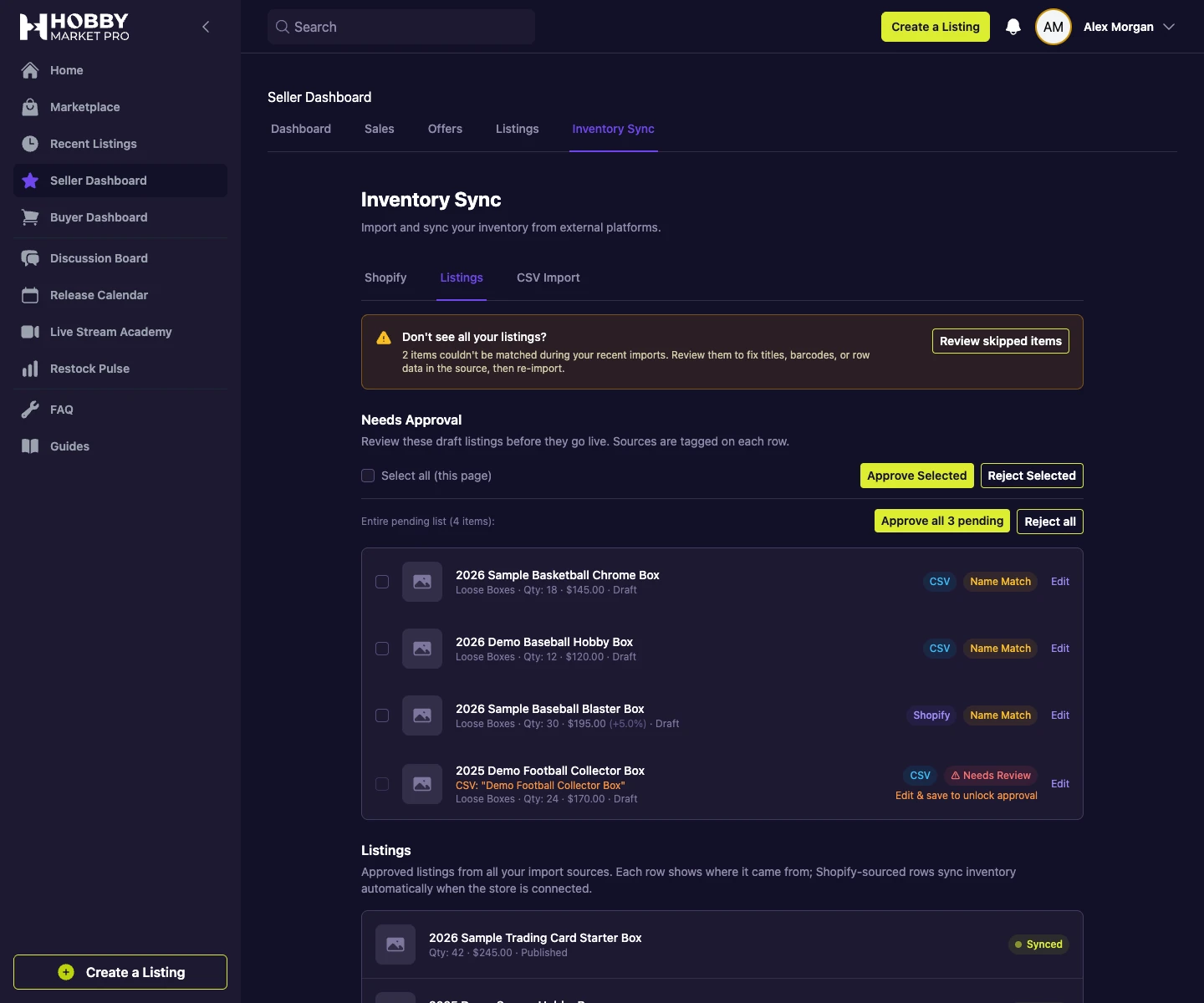
Matched rows become draft listings. The review interface separates pending items from approved inventory and surfaces uncertain matches for correction.
Unmatched rows remain available with reasons and their original information. Sellers can inspect these exceptions and correct the source data before re-importing.
 Open full-size screenshot
Keep progress when a batch needs attention
We built the importer to retain normalization results and record row-level outcomes. Saved progress supports recovery from interrupted processing, while a bad row doesn't prevent other rows from being handled.
Approval is a separate step. Importing a file doesn't automatically publish the resulting listings.
-
1
Upload or paste inventory
Provide the product, quantity, and price information in the seller workspace.
-
2
Normalize and match
Prepare structured rows and match them against the catalog.
-
3
Review matches and exceptions
Inspect draft listings, resolve uncertain products, and review skipped rows.
-
4
Approve publication
Publish selected listings or reject items that should remain off the marketplace.
Workflow illustration. Screenshots on this page show the local development application with synthetic data.
A review process around automated preparation
The implementation gives sellers a path from a source file to approved listings, with the intermediate decisions visible in the product.
AI handles part of the preparation. Catalog matching, exception records, and seller approval provide the controls around it. The same review pattern also serves inventory imported from Shopify.
More work within the HobbyMP partnership
Marketplace transactions
From a negotiated offer to a completed order
Connect product discovery, offers, payments, and order updates in a marketplace built around how collectibles dealers trade.
Shopify integration
Keeping store inventory connected to the marketplace
Connect Shopify catalogs and stock updates with marketplace listings while preserving seller decisions about publication.

Which part of your workflow needs better software?
Start with the decisions, handoffs, and exceptions your team manages today.