

Keeping store inventory connected to the marketplace
For business leaders managing manual processes, another sales channel adds inventory work. We connected HobbyMP with Shopify catalogs, stock updates, and seller publication controls.
A seller already has a store to manage
Selling through another channel can mean maintaining another copy of the catalog. Stock changes and publication decisions need to travel between systems.
We built HobbyMP's Shopify connection around the seller's existing store, with catalog import, inventory updates, and controls for how listings appear on the marketplace.
Connect the catalog to marketplace operations
Bring store products into the review flow
The connection imports Shopify variants and matches them against HobbyMP's catalog. New matches become draft listings for seller approval; existing mappings support subsequent updates.
Respect the seller’s publication decisions
Incoming inventory events update mapped listing quantities. The application also includes outbound inventory adjustments tied to marketplace orders.
Sellers can require another approval when sold-out stock returns. A listing deliberately held in draft remains under seller control when inventory changes.
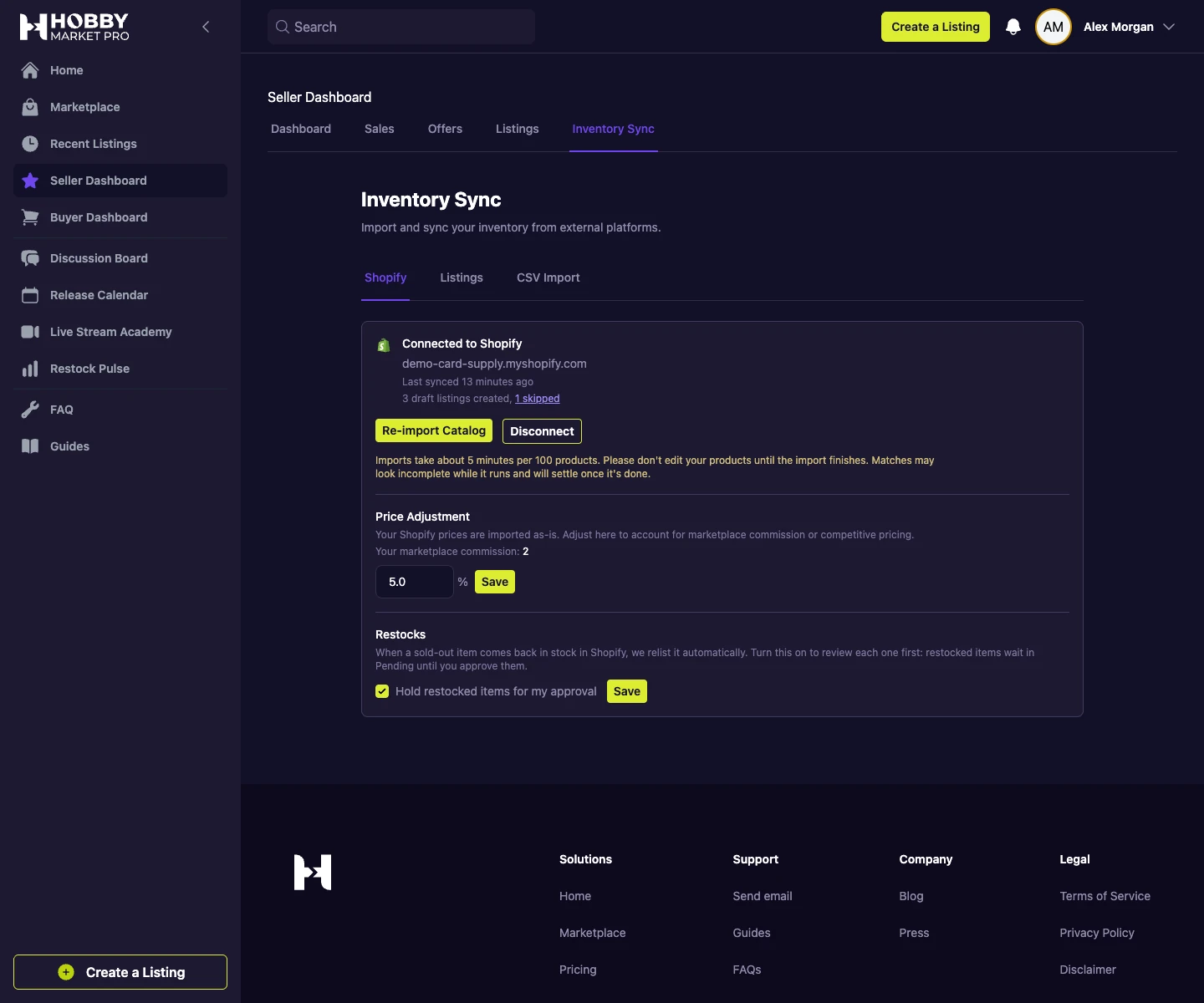 Open full-size screenshot
Handle updates as an ongoing workflow
We added event records to identify duplicate Shopify notifications and background jobs to process updates. The integration tracks outgoing changes to reduce updates echoing between the two systems.
Disconnect handling archives connected listings. These mechanisms give the integration explicit behavior when the store relationship or incoming data changes.
-
1
Connect the seller’s store
Authorize the store connection and establish its catalog mapping.
-
2
Review imported products
Approve the draft marketplace listings created from matched variants.
-
3
Process inventory changes
Apply incoming stock updates and send order-related quantity adjustments.
-
4
Preserve publication choices
Keep seller-held drafts and restock approval rules separate from stock quantity.
Workflow illustration. Screenshots on this page show the local development application with synthetic data.
Extend the marketplace into existing store workflows
The integration connects a seller's store inventory with the marketplace's catalog and approval process. It gives the product a defined relationship between external stock and local listings.
This work extends the original commerce application with the synchronization and operational controls needed to support another sales channel.
More work within the HobbyMP partnership
Marketplace transactions
From a negotiated offer to a completed order
Connect product discovery, offers, payments, and order updates in a marketplace built around how collectibles dealers trade.
Inventory onboarding
From inventory files to listings sellers can review
Turn uploaded or pasted inventory into catalog matches, draft listings, and a review queue that keeps sellers in control.

Which part of your workflow needs better software?
Start with the decisions, handoffs, and exceptions your team manages today.